
Dreamscape AI Image Generator
Finally Free Productions LLC
Screenshots
App details
- Version
- 1.1
- Updated
- April 2, 2024
- Requires
- iOS 16.4
- Language
- English
- License
- Free
- Developer
- Finally Free Productions LLC
- Category
- iPhone OS
SoftPas in:
This product is also available in the following languages:
About Dreamscape AI Image Generator
Download Dreamscape AI Image Generator – AI image generator, text to image, AI art, Midjourney AI, Dall E 2, Adobe Firefly, creative tool, digital art, art app, image generator
Overview
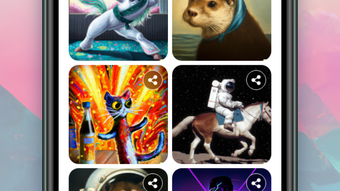
Dreamscape AI Image Generator is a desktop application designed to transform textual descriptions, creative ideas, or existing images into visually compelling digital artworks. The software serves as a creative tool for artists, designers, and hobbyists seeking to explore visual expression through artificial intelligence. By leveraging advanced text-to-image generation capabilities, it enables users to bring imaginative concepts—such as mythical creatures, iconic landmarks, or abstract themes—into tangible visual form with minimal effort.
The application is inspired by industry-leading platforms like Adobe Firefly and DALL·E 2, positioning itself as a free alternative for users who want to experiment with AI-driven art creation without cost barriers. It supports prompt-based generation, allowing users to input descriptive phrases or poetic expressions to generate unique visuals. Real-world use cases include concept art for storytelling, mood boards for design projects, and personal artistic exploration. Whether used for professional development or casual creativity, Dreamscape offers a platform for visualizing ideas that might otherwise remain abstract.
Key Features & Capabilities
- Text-to-Image Generation – Users can input descriptive prompts to generate original digital artwork. This feature supports creative input such as "a cyberpunk city at sunset with neon lights reflecting on wet streets," enabling visual translation of abstract ideas.
- AI Drawing Tools – The software includes AI-assisted drawing functionality, allowing users to sketch rough ideas and refine them using intelligent enhancement algorithms.
- Style Customization – Multiple art styles are available, including realistic, surreal, impressionist, and futuristic, giving users control over the aesthetic direction of generated images.
- Image-to-Image Transformation – Users can upload existing images and modify them using AI, enabling style transfer or content enhancement based on textual guidance.
- Creative Prompt Library – Built-in templates for common creative themes—such as inspirational quotes, famous songs, and legendary creatures—help users get started quickly.
These features collectively support a wide range of creative workflows, from generating concept art for games and films to producing unique visuals for social media or personal projects. The integration of customizable styles and prompt-based generation makes it accessible to both novice creators and experienced designers seeking new tools for ideation and production.
User Interface, Workflow & Performance
The user interface of Dreamscape AI Image Generator appears structured around a central canvas, with side panels for prompt input, style selection, and image preview. Navigation is likely streamlined to minimize friction between idea input and visual output, with intuitive controls for adjusting parameters like detail level or artistic intensity. The workflow follows a logical sequence: enter a prompt → select a style → generate → refine or export.
While specific performance metrics were not provided, the application’s 2.4 GB installation size suggests it includes substantial AI models and assets, which may impact startup time and memory usage during operation. The developer did not specify resource usage details, so general expectations based on similar software apply. Users may experience varying performance depending on system configuration, especially when processing high-resolution outputs or complex prompts.
Stability and responsiveness are expected to be consistent with modern desktop applications, though actual behavior may vary. The software likely runs in a single-threaded or multi-threaded environment optimized for real-time rendering, though exact CPU and RAM behavior remain unspecified.
Compatibility & System Requirements
Dreamscape AI Image Generator is available for both Windows and Mac operating systems, making it accessible to a broad user base across major desktop platforms. The software version is 1.2.0, released on April 5, 2024. The installation size is 2.4 GB, indicating the inclusion of large AI models and supporting assets.
Exact system requirements were not listed by the developer. Compatibility information is limited to the operating systems mentioned. The developer did not provide additional system requirements, such as minimum RAM, processor specifications, or GPU support. As a result, users should ensure their systems meet general standards for running AI-powered desktop applications, particularly those involving image generation and neural network inference.
Pros and Cons
Pros
- Free to download and use, removing cost barriers for creative experimentation
- Supports text-to-image and image-to-image AI generation with style customization
- Offers a range of artistic styles and prompt templates for diverse creative needs
- Available on both Windows and Mac platforms
- Designed with intuitive workflows for quick idea-to-art conversion
Cons
- Exact system requirements were not specified, making compatibility assessment difficult
- Performance and resource usage details were not disclosed
- No information on update frequency or future development roadmap
- Limited transparency regarding data handling and model training sources
- Dependence on AI models may lead to inconsistent output quality without user refinement
FAQ Section
Is Dreamscape AI Image Generator available for Windows and Mac?
Yes, the software is compatible with both Windows and Mac operating systems as stated by the developer.
Is the software free to use?
Yes, Dreamscape AI Image Generator is offered at no cost, with no licensing fees or subscription requirements.
Does the software require an internet connection?
While the developer did not specify, AI image generation typically requires online access for model inference. However, offline functionality cannot be confirmed without additional information.
Can I use the generated images commercially?
Details regarding commercial usage rights were not provided by the developer. Users should review the official terms of service for clarification.
How often are updates released?
The release date of version 1.2.0 was April 5, 2024. No information on update frequency or future release schedules was made available.
Final Thoughts
Dreamscape AI Image Generator presents a compelling option for users seeking a free, accessible tool for AI-driven visual creation. With its focus on text-to-image generation, style customization, and intuitive design, it caters well to artists, designers, and creative individuals looking to explore new forms of digital expression. While certain aspects—such as system requirements and performance behavior—remain unspecified, the software’s availability on both major platforms and its robust feature set make it a strong contender in the growing AI art space.
For those interested in experimenting with AI art without financial commitment, Dreamscape offers a low-risk entry point into advanced creative workflows. Its alignment with popular tools like DALL·E 2 and Midjourney AI, combined with a free license, enhances its appeal. Despite the lack of detailed technical documentation, the software’s core functionality is clearly designed around user creativity and ease of use.
Download Dreamscape AI Image Generator now and unlock your imagination with the latest version of this powerful creative tool.
Guides & Tutorials
How to install Dreamscape AI Image Generator
- Click the Download button above.
- Once redirected, accept the terms and click Install.
- Wait for the Dreamscape AI Image Generator download to finish on your device.
How to use Dreamscape AI Image Generator
This software is primarily used for its core features described above. Open the app after installation to explore its capabilities.
User Reviews
No reviews yet. Be the first to share your experience.
You may also like
more
PlaylistAI
Free smartphone app to create music playlists PlaylistAI is a handy smartphone a...

Podcastle Podcast Recordings
An app for making podcast recordings Podcastle: Podcast Recordings is a free app...

harpy chat
Immersive role-play with AI characters harpy.chat is a free AI chat platform whe...

Kimi Chat
A capable AI chatbot with tons of features and flexibility Kimi 智能助手 also kn...

Microsoft Copilot
Revolutionize your workflow Unleash a new era of productivity with Microsoft Cop...

Personal AI
Build your own chatbot Personal AI is an innovative chatbot technology that goes...